Plenty of email platforms say they’re free. Fewer stay useful once you add real subscribers, send more than one newsletter a month, and want a welcome email to go out on its own. Free plans also keep shrinking. Mailchimp and MailerLite both cut theirs hard in 2026, so a lot of “best free” lists online now quote numbers that are wrong.
I compared the free plans of the main email marketing platforms and checked their limits in November 2026 against vendor pricing pages, help docs and recent reviews. Below you’ll find the eleven free plans worth considering, what each one actually lets you do, where the catch is, and which one fits your situation.
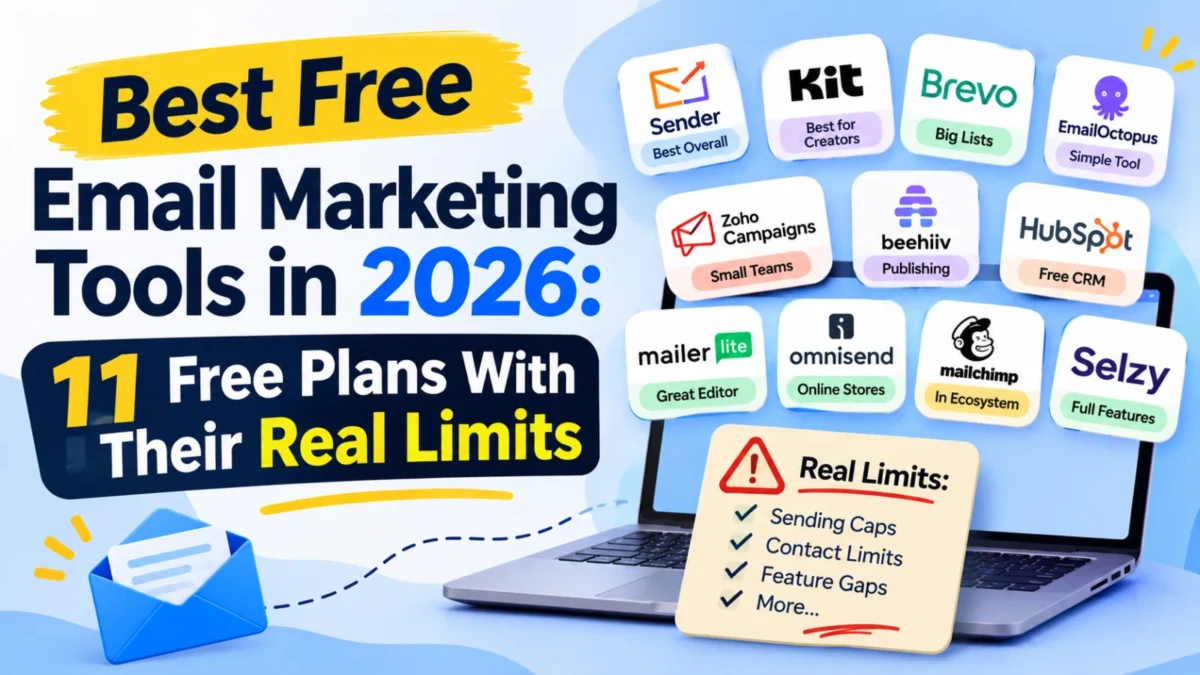
Sender has the best all round free plan (2,500 subscribers, 15,000 emails a month, automation included). Kit is the best free option for creators with big lists (up to 10,000 subscribers). Brevo is best if you store lots of contacts but send rarely. Zoho Campaigns is the pick for small teams that need more than one login.
If you’re new to the channel, my guide on what email marketing is and how it works covers the basics before you pick a tool.
The best free email marketing tools at a glance
- Sender: best free plan overall
- Kit: best for creators and large free lists
- Brevo: best for big contact lists with light sending
- EmailOctopus: best simple newsletter tool
- Zoho Campaigns: best for small teams
- beehiiv: best for publishing a newsletter
- HubSpot: best if you want a free CRM too
- MailerLite: best editor on a small free list
- Omnisend: best for small online stores
- Mailchimp: best only if you’re already in its ecosystem
- Selzy: best for testing with full features and 24/7 support
Free plan limits compared
These are the headline limits as of November 2026. Vendors change them often, so check the pricing page before you commit.
| Tool | Free contacts | Free emails | Automation on free | Main catch |
|---|---|---|---|---|
| Sender | 2,500 | 15,000 per month | Yes | Sender branding, 1 seat |
| Kit | 10,000 | Unlimited | 1 basic automation | Kit branding and a Kit recommendation slot |
| Brevo | Up to 100,000 | 300 per day | Yes, limited | Daily cap, Brevo logo |
| EmailOctopus | 2,500 | 10,000 per month | Basic | Lighter feature set |
| Zoho Campaigns | 2,000 | 6,000 per month | No workflows | No A/B testing |
| beehiiv | 2,500 | Unlimited | No | Newsletter focused, branding |
| HubSpot | CRM contacts | 2,000 per month | 1 automated action | HubSpot branding, 3 templates |
| MailerLite | 250 | 2,500 per month | Up to 3 | Small list cap, approval process |
| Omnisend | 250 | 500 per month | Yes | Tiny send allowance |
| Mailchimp | 250 | 500 per month (250 per day) | No multi-step flows | Smallest useful limits |
| Selzy | 100 | 1,000 per month | Yes | Very small list cap, Selzy branding |
What “free” really means in email marketing
Every free plan is limited in at least one of three ways: how many contacts you can store, how many emails you can send, or which features you can touch. Most limit all three. Knowing which limit hits you first is more useful than reading the headline number.
A quick way to compare is to divide the monthly send allowance by the contact limit. That tells you how many emails each subscriber can get per month if your list is full:
- Sender: 15,000 ÷ 2,500 = 6 emails per subscriber
- EmailOctopus: 10,000 ÷ 2,500 = 4
- Zoho Campaigns: 6,000 ÷ 2,000 = 3
- MailerLite: 2,500 ÷ 250 = 10
- Mailchimp: 500 ÷ 250 = 2
- Selzy: 1,000 ÷ 100 = 10
Kit and beehiiv don’t cap sends, so their limit is purely the list size. Brevo is the odd one out: it lets you store a huge list but caps you at 300 emails a day, so a single campaign to 1,500 people takes five days to finish going out.
The 11 best free email marketing tools
1. Sender: Best Free Plan Overall
Best for: Small businesses that want automation without paying
Free plan: 2,500 subscribers, 15,000 emails per month
Website: sender.net
Sender is the free plan I’d point most small businesses to first. The numbers are generous, but the real reason is that the tools you need to run proper email marketing aren’t locked away. According to Sender’s pricing page, the Free Forever plan includes newsletters, email automation, landing pages, signup forms and popups, and transactional emails.
That means you can build a welcome series, an abandoned cart flow and a monthly newsletter on the same free account. On most other free plans, at least one of those needs an upgrade.
Key features:
- Drag and drop email builder with templates
- Automation workflows on the free tier
- Popups, signup forms and landing pages
- Transactional email support
Limitations: Free emails carry Sender branding, and you get a single seat, so it’s not ideal if several people need to log in. SMS and multi-user access sit on paid plans. Sender is also a smaller brand than Mailchimp or HubSpot, so you’ll find fewer third party tutorials and integrations.
2. Kit: Best for Creators and Large Free Lists
Best for: Bloggers, writers, coaches and creators
Free plan: Up to 10,000 subscribers, unlimited emails
Website: kit.com
No other mainstream platform lets you store 10,000 subscribers for free with no send cap. Kit’s help centre lists unlimited forms and landing pages, unlimited email sends, and the ability to sell digital products and subscriptions on the Newsletter plan.
If your main job is sending a regular newsletter and growing an audience, Kit can carry you a long way before you pay anything.
Key features:
- 10,000 subscriber free tier with unlimited sends
- Unlimited landing pages and forms
- Tagging and segmentation
- Digital product and paid subscription sales
Limitations: Automation is the weak spot. The free plan gives you only one basic visual automation, so a welcome series plus a nurture sequence already pushes you to the paid Creator plan, which starts at $39 a month billed monthly. Kit also keeps one recommendation slot on your signup flow for itself, and earnings from that slot go to Kit. Free emails and forms carry Kit branding, and integrations aren’t included.
3. Brevo: Best for Big Contact Lists With Light Sending
Best for: Businesses with large lists that email occasionally
Free plan: Up to 100,000 contacts, 300 emails per day
Website: brevo.com
Brevo prices by how many emails you send rather than how many contacts you keep. That makes its free plan unusual: you can import a large customer database without hitting a wall, then send a capped number each day. You also get transactional email, a basic CRM and some marketing automation in the same account.
Key features:
- Large contact storage on the free tier
- Marketing automation (capped at 2,000 contacts per workflow)
- Transactional email through the same platform
- Basic CRM and live chat
Limitations: The 300 per day cap is the problem. If your list has more than 300 people, a newsletter can’t go out to everyone on the same day, and unused sends don’t roll over. Every free email carries the Brevo logo, and removing it costs extra even on the entry paid plan. New accounts also have to be approved before they can send, so you can’t import a list and fire a campaign the same afternoon.
4. EmailOctopus: Best Simple Newsletter Tool
Best for: Straightforward newsletters on a budget
Free plan: 2,500 subscribers, 10,000 emails per month
Website: emailoctopus.com
EmailOctopus keeps things simple. The free plan covers 2,500 subscribers and 10,000 emails a month, which is enough for about four emails per subscriber on a full list. The editor is clean, forms and landing pages are easy to set up, and paid plans stay cheap as you grow.
Key features:
- 2,500 subscriber free tier
- Drag and drop and HTML editors
- Forms and landing pages
- Low cost upgrade path
Limitations: It’s lighter than Sender or Brevo once you need serious automation, ecommerce features or detailed reporting. Some reviewers note that free accounts get shorter report history and limited support, so check the current terms if those matter to you.
5. Zoho Campaigns: Best for Small Teams
Best for: Teams who need several logins, especially Zoho users
Free plan: 2,000 contacts, 6,000 emails per month, admin plus 4 users
Website: zoho.com/campaigns
Most free plans give you one seat. Zoho gives you five. Zoho’s pricing FAQ explains that the Forever Free plan lets you manage up to 2,000 contacts and send up to 6,000 emails, which works out to three full campaigns a month to a full list.
If you already use Zoho CRM or other Zoho apps, the connections make it even more useful.
Key features:
- Five users on the free plan
- 2,000 contacts and 6,000 monthly emails
- Templates, signup forms and reports
- Native links with the Zoho suite
Limitations: Automation workflows and A/B testing aren’t part of the free plan. The interface feels older than newer tools. Zoho Campaigns also handles marketing email only, and Zoho points you to its separate ZeptoMail service for transactional messages like receipts and password resets.
6. beehiiv: Best for Publishing a Newsletter
Best for: Writers who treat their newsletter as a publication
Free plan: Up to 2,500 subscribers, unlimited sends
Website: beehiiv.com
beehiiv isn’t really a small business email marketing tool. It’s a newsletter publishing platform, and that’s where it shines. The free Launch plan includes newsletters, a website and podcast hosting for up to 2,500 subscribers, with no limit on sends.
Key features:
- Unlimited sends to 2,500 subscribers
- Hosted newsletter website
- Campaign analytics
- Built in recommendation network
Limitations: Email automations, the ad network and paid subscriptions sit on the paid Scale plan, which starts at $43 a month on annual billing. Removing beehiiv branding needs the higher Max plan. If you want to send abandoned cart emails or trigger messages from your store, look elsewhere.
7. HubSpot: Best If You Want a Free CRM Too
Best for: B2B businesses and service companies that track leads
Free plan: 2,000 email sends per month, free CRM, up to 2 users
Website: hubspot.com
HubSpot’s free email tool is part of its free CRM, and that’s the reason to choose it. Every email you send is tied to a contact record, so you can see who opened what and follow up from the same place. The HubSpot pricing page lists 2,000 email sends per calendar month with HubSpot branding on the free tools.
Key features:
- Free CRM with contact history
- Forms, live chat and basic reporting
- 2,000 marketing email sends per month
- Room to upgrade into a full marketing suite
Limitations: The email side is thin. You get only three email templates per account, a single automated action, and HubSpot branding on everything. Paid HubSpot plans can also get expensive quickly once you move past Starter, so check the upgrade path before you build your business around it.
8. MailerLite: Best Editor on a Small Free List
Best for: Very small lists that want a polished editor
Free plan: 250 subscribers, 2,500 emails per month
Website: mailerlite.com
MailerLite used to sit near the top of every free tools list. Then, in June 2026, it cut the free plan from 500 subscribers and 12,000 emails to 250 subscribers and 2,500 emails, with caps of three automations, three forms and one landing page. Many articles still quote the old numbers.
It’s still a good product. The editor and automation builder are among the easiest to use, and the free plan now suits someone starting from zero who expects to pay within a few months.
Key features:
- Clean drag and drop editor
- Visual automation builder (up to 3 on free)
- Forms and a landing page
- Two user seats on free
Limitations: At 250 subscribers, you’ll outgrow it fast. A small MailerLite logo appears in your email footer, and new accounts go through an approval check that can take a day or two. The Comfort plan starts at $12 a month.
9. Omnisend: Best for Small Online Stores
Best for: Shopify and WooCommerce stores just getting started
Free plan: 250 contacts, 500 emails per month
Website: omnisend.com
Omnisend is built for ecommerce, and its free plan includes the store automations that matter most: welcome emails, abandoned cart reminders and order follow ups. For a brand new store, testing those flows for free is worth more than a bigger send allowance.
Key features:
- Prebuilt ecommerce automations
- Product blocks pulled from your store
- Signup forms and popups
- SMS on paid plans
Limitations: 500 emails a month is very tight. Once your store has a few hundred customers, you’ll need a paid plan. Integrations are also limited on the free tier.
10. Mailchimp: Best Only If You’re Already in Its Ecosystem
Best for: Existing users with tiny lists
Free plan: 250 contacts, 500 sends per month, 250 per day
Website: mailchimp.com
Mailchimp is still the name most people think of first, but its free plan is now one of the weakest. Mailchimp’s own help article confirms the Free plan includes up to 250 contacts and 500 sends a month, with a daily send limit of 250. That’s two emails a month to a full list.
Key features:
- Familiar, well documented interface
- Basic templates and signup forms
- Huge integration library
- Landing pages and forms to try
Limitations: Multi-step automation and scheduling sit on paid plans, Mailchimp branding stays on every email, and support on free is limited. Sending pauses if you go over the contact or send limit. Unless you’re already set up there, the free plans above give you far more room. The Essentials plan starts at $13 a month for 500 contacts.
11. Selzy: Best for Testing With Full Features and 24/7 Support
Best for: Small businesses that want to try a full feature set before paying
Free plan: 100 contacts, 1,000 emails per month
Website: selzy.com
Selzy takes the opposite approach to most free plans. The contact limit is tiny, but the features aren’t stripped back. The free plan includes the email builder, automation, segmentation, A/B testing and analytics, and Selzy offers 24/7 support by chat, email and phone even to free users. No credit card is needed to sign up.
That makes it a sensible place to learn how automation and testing work before your list is big enough to matter. When you outgrow it, the upgrade is cheap: the paid Lite plan starts at about $7 a month and removes the send cap.
Key features:
- Automation, segmentation and A/B testing on the free tier
- AI email builder and templates
- Signup forms and popups
- 24/7 support on every plan
Limitations: 100 contacts is the smallest list cap here, so treat the free plan as a testing ground rather than a long-term home. Free emails carry a Selzy logo in the footer. Selzy is also a smaller brand than most tools on this list, so you’ll find fewer outside tutorials.
Other free plans worth a look
A few more tools have free tiers that didn’t make the main list but might suit you. Benchmark Email offers 500 contacts and 1,000 emails a month. AWeber and GetResponse both have small free plans of around 500 contacts. Moosend, despite showing up on some free lists, only offers a 30-day trial. ActiveCampaign and Klaviyo are excellent, but they’re paid tools first; I cover them in my roundup of the best email marketing tools overall.
The hidden catches in free plans
Headline limits are only half the story. These are the details that tend to bite after you’ve already moved your list.
Branding. Nearly every free plan adds the vendor’s logo or a “sent with” badge to your emails. It’s harmless for a hobby newsletter but can look cheap for a professional service.
How contacts are counted. Some platforms count unsubscribed and inactive contacts toward your limit. Mailchimp is the best known example: only archived, cleaned or deleted contacts drop out of the count. Clean your list before importing so you don’t waste your free allowance on people who’ll never open.
Daily caps. A monthly limit of 9,000 sounds similar to 10,000 until you realise one of them is 300 a day. If you send one big newsletter a month, a daily cap matters far more than a monthly one.
Account approval. Brevo and MailerLite both review new accounts before sending. That’s good for deliverability across their platform, but it can delay your first campaign.
Support windows. Several free plans limit support to email, forums or the first 30 days. If you’re not technical, Sender and Kit are friendlier here.
Automation depth. “Automation included” can mean one single-trigger email. Check how many workflows and steps you get, not just whether the word appears on the pricing page.
Which free tool should you choose?
Start with what you’re sending and who it’s for:
| Your situation | Best free pick | Why |
|---|---|---|
| Small business, wants automations | Sender | Automation, landing pages and 15,000 emails free |
| Creator or blogger | Kit | 10,000 subscribers, unlimited sends |
| Big contact list, occasional emails | Brevo | Stores up to 100,000 contacts |
| Simple newsletter | EmailOctopus or beehiiv | Clean, cheap to grow |
| Team of 2 to 5 people | Zoho Campaigns | Five users free |
| B2B lead tracking | HubSpot | Free CRM linked to every email |
| New online store | Omnisend | Free abandoned cart and welcome flows |
| Learning automation and A/B testing | Selzy | Full features and 24/7 support on free |
If you’re a complete beginner, my email marketing for beginners guide walks through building your first list and campaign, whichever platform you choose.
Set up your free tool properly
A free tool won’t help if your emails land in spam. Before your first send, do three things.
First, send from your own domain (you@yourbusiness.com), not a Gmail or Yahoo address. Most platforms will warn you about free mailbox addresses because they hurt delivery.
Second, authenticate that domain with SPF, DKIM and DMARC. It takes about 20 minutes in your domain settings, and every tool on this list has a guide. I explain what each record does in the authentication section of my email marketing guide.
Third, only email people who opted in, include your business address, and make unsubscribing easy. That’s both a legal requirement in most countries and the quickest way to protect your sender reputation.
When to move to a paid plan
Free plans are meant to be outgrown. Upgrade when one of these becomes true:
- Your list is about to pass the free contact limit.
- You need a welcome series or nurture sequence longer than the free plan allows.
- Vendor branding is starting to look out of place for your business.
- You need A/B testing, scheduling or better reports to improve results.
- Email is producing real revenue and support response time matters.
Entry paid plans on most of these tools cost between about $9 and $15 a month for small lists. Kit and beehiiv cost more because they’re priced for creators. If you’re watching every dollar across your marketing, these cheap digital marketing tools cover low cost options beyond email.
How to switch tools without losing subscribers
Moving between platforms is easier than most people expect. Export your subscribers as a CSV file, including tags and signup dates if you can. Import them into the new tool and mark them as already opted in only if they genuinely are.
The harder part is rebuilding automations and templates, so screenshot or document your flows before you close the old account. Update the signup forms on your website last, so no new subscribers fall into the gap. And send a short, friendly first email from the new platform to warm up the list rather than blasting your biggest promotion.
Common mistakes with free email marketing tools
- Picking the tool with the biggest number instead of the one whose limits match how you send
- Importing old, purchased or scraped lists, which can get a free account suspended
- Skipping domain authentication and wondering why opens are low
- Building complex flows on a plan that caps automation, then having to rebuild them later
- Spreading your list across several free accounts to avoid limits, which breaks most vendors’ terms
- Forgetting that a tool’s free plan can shrink, as Mailchimp’s and MailerLite’s did in 2026
Conclusion
For most small businesses, Sender is the best free email marketing tool right now. It gives you enough contacts, enough sends and real automation without asking for a card. Creators and bloggers should look hard at Kit’s 10,000 subscriber plan. Brevo suits large lists that you email occasionally, and Zoho Campaigns is the easy choice for a small team.
Whatever you pick, set up domain authentication on day one and clean your list before importing. That will do more for your results than any feature difference between free plans. If you’d like help choosing a platform or building your first campaigns, take a look at my digital marketing services or get in touch.
Frequently Asked Questions
What is the best free email marketing tool?
For most small businesses, Sender is the best free email marketing tool: 2,500 contacts, 15,000 emails a month and automation on the free plan. Creators should look at Kit, which allows 10,000 subscribers, and Brevo suits large lists you email only occasionally.
Is there a free email marketing tool with no limits?
No. Every free plan limits something: contacts, monthly or daily sends, automation, seats or branding. Kit and beehiiv allow unlimited sends, but they cap subscribers and add their own branding.
Which free email marketing tools include automation?
Sender, Brevo, Omnisend and Selzy include automation on their free plans. Kit allows one basic automation and MailerLite up to three, while Mailchimp has no multi-step flows and Zoho Campaigns has no workflows on free.
Is Mailchimp still free in 2026?
Yes, but the free plan is now small: 250 contacts and 500 emails a month, with a cap of 250 a day and no multi-step automations. Unsubscribed contacts also count toward the limit unless you archive or delete them.
When should I upgrade from a free email marketing plan?
Upgrade when your list is close to the free contact limit, when you need a longer welcome or nurture sequence, or when you need A/B testing and better reports. Entry paid plans on most of these tools cost about $9 to $15 a month for small lists.