Search “best social media marketing tools” and you will find lists of 10, 20 or even 50 apps, almost all ending in a free-trial button. Pick wrong and you pay $99 a month per user for features you never open, or you stack three subscriptions that all schedule the same posts.
The market also changed this year. Agorapulse closed its free plan in July, Instagram opened native scheduling to public accounts in March, and the big platforms now charge per user. Many guides still describe the old picture.
The truth is that these tools are not interchangeable. A scheduler, an inbox manager, an analytics dashboard and a design tool solve different jobs, and the price gap is huge: some of the best options are free, while premium platforms charge per seat and pass $2,000 a year for one person. The right choice depends on three things: the job you need done, your budget, and how many people touch your accounts.
Quick answer: The best social media marketing tools in 2026 are Buffer for simple scheduling, Metricool for analytics on a budget, Meta Business Suite as the best free tool for Facebook and Instagram, and Canva for visuals. Larger teams should compare Hootsuite and Sprout Social, which both charge per user. Prices and features below were last checked on October 17, 2026.
This guide compares 12 of the best tools on exactly those terms. Each entry shows who it is best for, what it costs, where it falls short, and what to pair it with. If you are also weighing email, analytics and design software, the wider list of best digital marketing tools for small businesses covers the full stack.
The 12 Best Social Media Marketing Tools in 2026: Quick List
- Buffer: best for beginners and simple scheduling
- Metricool: best for analytics and reporting on a budget
- Meta Business Suite: best free tool for Facebook and Instagram
- Canva: best for creating and scheduling visual content
- Hootsuite: best for larger teams that need social listening
- Sprout Social: best premium platform for reporting and support
- Agorapulse: best for inbox and community management
- Vista Social: best value for small teams
- SocialPilot: best for agencies managing many clients
- Later: best for visual brands and influencer campaigns
- Sendible: best budget all-in-one
- Typefully: best for X, Threads, Bluesky and LinkedIn text posts
How I Ranked These Tools
I compared published pricing, free-plan limits, network support and team features from vendor pages and independent pricing guides, then checked them against each other. Where sources disagreed, the entry says so.
Job fit: Does the tool do its main job (scheduling, engagement, analytics or design) better than alternatives at a similar price?
Value at your size: What do you actually pay for one person, for three people, and for ten social profiles? Per-user and per-channel pricing change the real cost fast.
Network coverage: Does it support the platforms you use, such as Facebook, Instagram, LinkedIn, TikTok, YouTube, X, Threads and Pinterest?
Ease of use: Can a beginner schedule a week of posts in the first session?
Reporting depth: Does it show clicks, leads and sales, or only likes?
Team features: Are approvals, roles and a shared inbox available without a huge price jump?
One honest caveat: every tool is limited by what each network allows through its API. That is why most schedulers offer similar core features, and why deep monitoring of platforms like X sits in the most expensive plans. Choose on workflow and price, not on the longest feature list.
What Changed in 2026
Four shifts matter if you are buying a tool today:
- Agorapulse ended its free plan. The company’s own help centre says the Free plan stopped being available to new and current users on July 6, 2026. Several popular guides still list it.
- Instagram opened native scheduling to public accounts. Since March 2026, eligible public accounts can schedule posts, carousels and Reels in the app without a Business or Creator account. It handles one account at a time and skips some formats such as collab posts, so it is a fit for solo creators, not teams.
- Per-user pricing is now normal. Hootsuite and Sprout Social charge per seat from the first user, so a team’s bill grows with every teammate.
- AI is a baseline feature. Almost every tool now includes a caption assistant, so AI alone is no longer a reason to choose one tool over another.
What Are Social Media Marketing Tools (and Which Type Do You Need)?
A social media marketing tool is any software that helps you plan, publish, engage with or measure your social presence. Most fall into six types:
- Schedulers and publishers queue posts across networks from one calendar.
- Inbox and engagement tools collect comments, DMs and reviews in one place.
- Analytics and reporting tools show what worked and package it for clients or managers.
- Content creation tools handle graphics, video and captions.
- Social listening tools track brand mentions, keywords and competitors.
- Link-in-bio and automation tools turn social traffic into clicks and conversations.
All-in-one platforms such as Hootsuite and Sprout Social cover most of these. Specialist tools cover one or two, usually for less money. Decide which networks your customers actually use first, then pick the tool that supports those networks well.
Do You Need a Paid Tool?
Not always. A solo business posting to two or three accounts can run well on free plans: Buffer’s free tier, Metricool’s free plan, Meta Business Suite and each network’s own analytics cover the basics. Paid tools earn their price when you need what free plans withhold: unlimited scheduling, team approvals, a unified inbox, competitor tracking and white-label reports.
Social traffic also works better when your website is ready for it. If posts send people to pages that are slow or hard to find on Google, fix that side too. The best SEO tools show which pages need work, and an experienced SEO consultant can handle the fixes for you.
The 12 Best Social Media Marketing Tools in 2026
1. Buffer: Best for Beginners and Simple Scheduling
Best for: Solo business owners, creators and small teams that want an easy scheduler
Pricing: Free plan with 3 channels and 10 scheduled posts per channel; Essentials from $6/month per channel; Team from $12/month per channel
Website: buffer.com
Buffer is one of the longest-running schedulers and still one of the easiest to learn. It supports Facebook, Instagram, LinkedIn, TikTok, YouTube, Pinterest, Threads, Bluesky, Mastodon, X and Google Business Profile, and it says it also supports Substack Notes. Per-channel pricing is the big advantage: you pay for the accounts you use, so a brand with three channels stays cheap. Buffer also offers an API and an MCP connection for linking AI assistants to your account.
Key features:
- Calendar and queue-based scheduling
- Community inbox for comments and mentions
- Insights reports and an AI assistant for drafting and repurposing posts
- Start Page for a link-in-bio
Limitations: Buffer itself says it is not built for deep enterprise listening or multi-layer approvals. Costs rise with every channel, and Buffer has changed plans and pricing before, so confirm current limits.
2. Metricool: Best for Analytics and Reporting on a Budget
Best for: Marketers and small agencies who want strong reports without enterprise pricing
Pricing: Free plan for 1 brand; paid plans from about $20 to $25/month depending on billing and source; higher tiers add team management and approvals
Website: metricool.com
Metricool combines scheduling with analytics across social accounts, your website and ad accounts from Google, Meta and TikTok. You can track competitors, build a link-in-bio page and send data to Looker Studio. It is the best answer to the question “which of my posts and ads actually brought traffic?” Pricing is per brand, not per user.
Key features:
- Social, web and ad analytics in one dashboard
- Competitor tracking, including on the free plan
- Link-in-bio and social inbox
- Looker Studio connector for custom dashboards
Limitations: Pure scheduling feels secondary to reporting, and free-plan post limits are reported differently across sources, so check the live pricing page.
3. Meta Business Suite: Best Free Tool for Facebook and Instagram
Best for: Businesses that only need Facebook and Instagram
Pricing: Free
Website: business.facebook.com
Meta Business Suite is Meta’s free tool for managing Facebook Pages and Instagram accounts together. You can schedule posts, Stories and Reels, reply to comments and messages from Messenger and Instagram Direct in one inbox, and manage ads. For a business that sells only through those two networks, it may be all you need.
Key features:
- Free scheduling for Facebook and Instagram
- Shared inbox for comments, Messenger and Instagram Direct
- Built-in insights and ad management
Limitations: It covers Meta’s platforms only. For LinkedIn, TikTok, YouTube, X or Pinterest you need another tool.
4. Canva: Best for Creating and Scheduling Visual Content
Best for: Anyone who designs their own posts, carousels, Reels covers and ads
Pricing: Free plan available; Pro about $15/month, or about $10/month billed annually. The social content planner is a Pro feature.
Website: canva.com
Canva is not a full social manager, but it solves the bottleneck for most small teams: producing consistent visuals. Templates, brand kits, background removal and Magic Resize let one person turn a single idea into posts for every network. On Pro, its content planner can schedule posts to several platforms, so a small business can design and publish in one place.
Key features:
- Thousands of social post, Story and video templates
- Brand kits for consistent colors, fonts and logos
- Magic Resize to adapt one design to every format
- Content planner on Pro for direct scheduling
Limitations: Analytics and inbox tools are minimal, so pair it with Buffer or Metricool if you need reporting.
5. Hootsuite: Best for Larger Teams That Need Social Listening
Best for: Teams that need publishing, listening, inbox and analytics in one platform
Pricing: Standard from $99/user/month billed annually, with up to 10 social profiles; higher tiers are priced per user and rise quickly, so check the live pricing page. No free plan, but there is a free trial.
Website: hootsuite.com
Hootsuite covers publishing, a unified inbox, listening and benchmarking against similar businesses. Its listening has grown stronger since it acquired Talkwalker, and its OwlyGPT assistant helps with captions and performance questions. It suits organizations where someone is paid to run social media full time.
Key features:
- Scheduling across major networks
- Social listening and keyword monitoring
- Granular team permissions
- Industry benchmarks in reports
Limitations: Pricing is per user from the first seat, so a team of three on Standard pays about $297 a month. The dashboard is dense for beginners, and one hands-on tester found AI drafts needed editing before publishing.
6. Sprout Social: Best Premium Platform for Reporting and Support
Best for: Established brands and agencies that value deep reporting and human support
Pricing: Per seat, billed annually: Essentials $79, Standard $199, Professional $299, Advanced $399 per month. Monthly billing costs roughly 25% to 33% more. Free trial available.
Website: sproutsocial.com
Sprout Social is the polished premium option. You get a Smart Inbox, listening, review management, competitor insights and detailed reports, plus support when something breaks. Influencer marketing (from its Tagger acquisition) and employee advocacy sit on top. Standard is where most teams start, and it is capped at 5 social profiles.
Key features:
- Smart Inbox that unifies messages
- Keyword and location monitoring
- Competitor and paid-social insights on higher tiers
- Approval workflows and message tagging
Limitations: Seat-based pricing multiplies fast. Three seats on Standard cost about $597 a month, and three on Professional about $897, before add-ons.
7. Agorapulse: Best for Inbox and Community Management
Best for: Teams that handle many comments, DMs and reviews
Pricing: Per user, billed annually: Standard $79, Professional $119, Advanced $149 per month, each with 10 social profiles shared across users. The free plan ended on July 6, 2026.
Website: agorapulse.com
Agorapulse puts replies to organic and paid posts, mentions, DMs and reviews into one inbox. An Inbox Assistant sorts messages and you can assign replies to the right teammate. It also schedules posts, ties them to campaigns and adds approval workflows for teams. It is a strong choice when customer conversations matter more than posting volume.
Key features:
- Unified inbox for comments, DMs, mentions and reviews
- Inbox Assistant and saved replies
- Campaign tagging, approvals and reporting
- AI writing assistant
Limitations: Per-user pricing adds up, and anything you read online about a free plan is out of date.
8. Vista Social: Best Value for Small Teams
Best for: Small teams that need collaboration without per-seat platform pricing
Pricing: Professional from $79/month with 3 users and 15 social accounts
Website: vistasocial.com
With many tools, adding a teammate means paying a serious premium. Vista Social flips that: the Professional plan includes extra users and 15 accounts at a fraction of per-seat prices. It supports a wide list of networks, including Facebook, Instagram, LinkedIn, TikTok, YouTube, Pinterest, Threads, Bluesky, Google Business Profile and Reddit, and adds messaging, listening and basic task management.
Key features:
- Team seats and 15 accounts at an entry price
- Wide network support
- Social inbox, listening and DM automations
- AI assistant for captions
Limitations: The web app feels more basic than premium rivals, so expect less polish.
9. SocialPilot: Best for Agencies Managing Many Clients
Best for: Agencies and freelancers handling many client accounts on a budget
Pricing: Entry plans from about $25 to $30/month for 1 user and 7 accounts (sources differ by billing); extra users and accounts scale up. No free plan, but there is a free trial.
Website: socialpilot.co
SocialPilot is built around agency workflows: white-label client dashboards, shareable approval links that need no client sign-up, and branded reports. It gives one of the best account-to-price ratios in this category, which is why agencies recommend it.
Key features:
- White-label client dashboards and reports
- Approval links for clients
- Role-based permissions
- Bulk scheduling
Limitations: It has fewer listening features than Hootsuite or Sprout Social, and the entry plan includes only one user.
10. Later: Best for Visual Brands and Influencer Campaigns
Best for: Instagram, TikTok and Pinterest brands, creators and influencer campaigns
Pricing: Starter about $25/month (up to 30 posts per profile), Growth about $50, Scale about $110; lower rates on annual billing. No free plan, but there is a free trial.
Website: later.com
Later began as an Instagram-first visual planner and now adds influencer discovery, campaign management, social listening and a link-in-bio page. You can see your grid before you publish, which suits brands that care about aesthetics.
Key features:
- Visual content calendar and media library
- Link-in-bio page
- Influencer discovery and campaign tracking
- Social listening
Limitations: Its recent focus on influencer marketing means plain scheduling is no longer its main selling point, and the entry plan’s 30-post cap per profile is tight for busy accounts.
11. Sendible: Best Budget All-in-One
Best for: Small businesses and freelancers who want the basics done well for less
Pricing: Creator plan from $29/month with 1 user and 6 social accounts
Website: sendible.com
Sendible delivers a stripped-down version of what Hootsuite offers for far less. It supports Instagram, Facebook, TikTok, LinkedIn, Google Business Profile, YouTube, Threads, Bluesky, X and WordPress. You can queue posts, pull in RSS feeds, reply to comments and connect Google Analytics to see how social drives site traffic.
Key features:
- Scheduling and queues across major networks
- Quick performance reports
- RSS-to-post automation
- Google Analytics integration
Limitations: Reports are lighter than premium platforms, and deep X analytics and competitor research are missing at this price.
12. Typefully: Best for X, Threads, Bluesky and LinkedIn Text Posts
Best for: Founders, consultants and creators who build an audience through written posts
Pricing: Free plan with 15 posts per month; paid plans from $10/month
Website: typefully.com
Text-based networks are now spread across X, Threads, Mastodon, Bluesky and LinkedIn. Typefully lets you write once and publish to several of them, splits long text into threads, and includes analytics and team feedback. It is narrow by design, which is why it does that one job so well.
Key features:
- Write and schedule across X, Threads, Mastodon, Bluesky and LinkedIn
- Automatic thread splitting
- Built-in analytics and collaboration
- AI help for edits and ideas
Limitations: It does not cover visual networks, so pair it with Canva or Buffer if you also post on Instagram or TikTok.
Other Tools Worth a Look
- Tailwind: built for Pinterest, with a free plan of 1 account and 5 posts a month and paid plans from about $29.99/month.
- Manychat: automates DMs and comment replies on Instagram, Facebook and WhatsApp, with a limited free plan and paid plans from about $14 to $15/month.
- Zoho Social: a free plan for one user and paid plans from about $15/month, best if you already use Zoho CRM.
- Socialinsider: analytics and competitor benchmarking only, from about $99/month.
- Social Champ: from $29/month for 6 accounts and 2 users, with bulk scheduling.
- Planoly: from $16/month, built around Instagram grid planning.
- StoryChief: a content platform with a free tier, useful if you publish blog and social content from one calendar.
- Enterprise suites such as Sprinklr: quote-only pricing, only worth considering for very large organizations.
Free and Native Tools to Set Up First
Before paying for anything, set these up:
- Free plans: Buffer (3 channels), Metricool (1 brand), Typefully (15 posts a month), Canva Free for designs, and Zoho Social (1 user).
- Instagram’s native scheduler: public accounts can schedule posts, carousels and Reels in the app since March 2026. It handles one account at a time and skips formats such as collab posts, so use it only when one person runs one account.
- Meta Business Suite: free scheduling and inbox for Facebook and Instagram.
- Google Analytics 4: shows which posts send visitors who read, sign up or buy.
- UTM links: tag every link you share so social traffic is clear in analytics. Free builders from Google and Buffer make this a two-minute job.
If your next step is paid promotion, start with a small test budget, measure enquiries rather than likes, and bring in paid advertising management if you want help running the campaigns.
What a Three-Person Team Really Pays
A starting price hides the real bill. Here is what three people would pay each month on entry plans billed annually, before add-ons, using the prices above.
| Tool | Pricing basis | Entry plan for 3 users | Notes |
|---|---|---|---|
| Buffer | Per channel | $30 for 5 channels on Essentials; $60 on Team | Team plan allows unlimited users |
| Metricool | Per brand | About $20 to $25 | Paid plan covers multiple brands |
| Vista Social | Per plan | $79 | Includes 3 users and 15 accounts |
| Agorapulse | Per user | $237 | Standard, $79 x 3, 10 shared profiles |
| Hootsuite | Per user | $297 | Standard, $99 x 3, 10 profiles |
| Sprout Social | Per seat | $597 | Standard, $199 x 3, 5 profiles |
The pattern is clear. Per-channel and per-brand tools cost far less for small teams, while per-seat platforms make sense only when you need their listening, support or governance. If you manage many accounts with few people, per-seat pricing hurts less. If you manage few accounts with many people, it hurts a lot.
AI Features: What Is Useful and What Is Hype
Nearly every tool on this list now has an AI assistant: Buffer for ideas and repurposing, Hootsuite’s OwlyGPT, Agorapulse’s writing helper, Sprout Social’s AI Assist, Typefully’s edit suggestions. They are genuinely useful for first drafts, rewriting a post for another network, sorting inbox messages and summarizing reports.
They do not replace strategy. AI does not know your customers, your offers or your tone unless you tell it. The practical approach: use AI to draft, then edit for a real opinion, a specific example and your brand voice. Buy for the scheduling, inbox and reporting features first, since AI features are now similar across most platforms. Also note that tools which connect to AI assistants, such as Buffer’s API and MCP link, are worth a look if you already work inside ChatGPT or Claude.
Side-by-Side Comparison Table
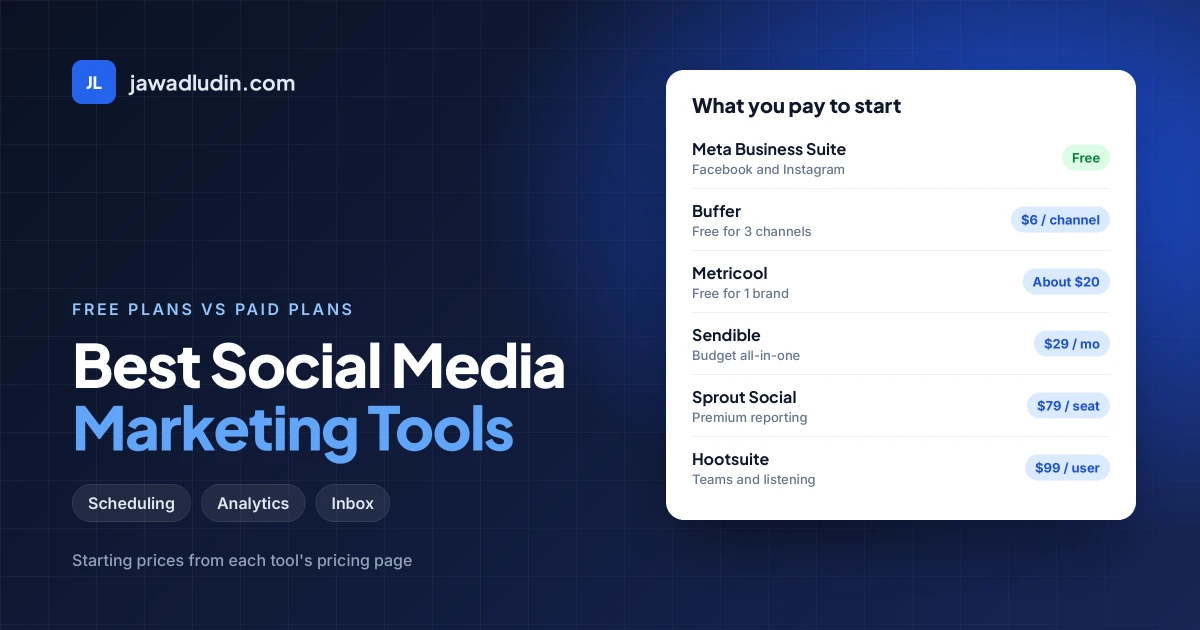
| Tool | Best For | Starting Price | Free Option | Pricing Basis |
|---|---|---|---|---|
| Buffer | Simple scheduling | $6/mo per channel | Yes (3 channels) | Per channel |
| Metricool | Analytics on a budget | About $20-25/mo | Yes (1 brand) | Per brand |
| Meta Business Suite | Facebook and Instagram | Free | Fully free | N/A |
| Canva | Visual content | About $10-15/mo (Pro) | Yes (no scheduler) | Per user |
| Hootsuite | Teams with listening | $99/user/mo | No (trial) | Per user |
| Sprout Social | Premium reporting | $79/seat/mo (Essentials) | Trial | Per seat |
| Agorapulse | Inbox management | $79/user/mo | No (ended July 2026) | Per user |
| Vista Social | Small teams | $79/mo | Trial | Per plan |
| SocialPilot | Agencies | About $25-30/mo | Trial | Per plan |
| Later | Visual and influencer | About $25/mo | Trial | Per plan |
| Sendible | Budget all-in-one | $29/mo | Trial | Per plan |
| Typefully | Text networks | $10/mo | Yes (15 posts) | Per plan |
Prices reflect published figures checked in October 2026 and change without notice. Always confirm on the vendor’s pricing page.
Four Tool Stacks for Any Budget
The $0 stack (new brands and learners): Meta Business Suite for Facebook and Instagram, Buffer Free or Metricool Free for other networks, Canva Free for designs, and Google Analytics 4 with UTM links. Enough to publish consistently and learn what works.
The lean stack (about $30 to $60/month): Buffer Essentials or Sendible for scheduling, Canva Pro for design, and Metricool free for reporting. Ideal for solo owners, freelancers and local shops.
The team stack (about $80 to $250/month): Vista Social or Metricool for scheduling and reports, Agorapulse for the inbox if conversations drive sales, plus Canva Pro. Built for small teams publishing daily across several channels.
The agency stack (about $100 to $300/month): SocialPilot for client dashboards and approvals, Metricool for reports, Canva Pro for creative, and Typefully for founder accounts on text networks.
Social media also works best alongside a channel you own. Turning followers into subscribers through email marketing means you can still reach them when platform reach drops. If you want help turning these tools into a real plan, digital marketing services can cover strategy, setup and reporting.
How to Choose the Right Tool
1. Start with the job, not the brand. Write down your biggest problem: inconsistent posting, slow replies, weak reporting or poor visuals. Buy for that job first.
2. Count seats, channels and profiles. Per-user tools (Hootsuite, Sprout Social, Agorapulse) get expensive with every teammate. Per-channel tools (Buffer) get expensive with every account.
3. Check your networks. Confirm the tool supports every platform you use, and read what it can actually do on each. Features differ between Instagram, TikTok, LinkedIn and X.
4. Use the free plan or trial first. Schedule two weeks of real content before you commit.
5. Check payment and pricing before you commit. If you market from outside the US or Europe, confirm the vendor’s billing currency and that it accepts a payment method you can use. Start on a free plan or monthly billing until you are sure.
6. Pay annually only after a month of use. Annual billing saves money, but it can add 25% or more to monthly billing on tools like Sprout Social, so it only pays off if the tool fits your workflow.
7. Do not over-collect. One manager plus one design tool beats five half-used subscriptions.
Common Mistakes When Buying Social Media Tools
- Buying an enterprise platform before you have a consistent posting habit.
- Paying per-user pricing for a team that only needs shared logins.
- Trusting an old guide that lists a free plan that no longer exists.
- Judging tools by AI features instead of scheduling, inbox and reporting quality.
- Ignoring link tracking, so you cannot tell which posts drive enquiries.
- Scheduling everything and never replying to comments.
- Forgetting that prices, limits and network support change often.
Frequently Asked Questions
What are the best social media marketing tools?
For most businesses: Buffer for simple scheduling, Metricool for analytics on a budget, Meta Business Suite as a free Facebook and Instagram tool, and Canva for visuals. Hootsuite or Sprout Social suit larger teams that need listening, and Agorapulse suits inbox-heavy brands.
What is the best free social media marketing tool?
Meta Business Suite is the best fully free option for Facebook and Instagram. For other networks, Buffer’s free plan covers three channels and Metricool’s free plan covers one brand with competitor tracking. Add Canva Free for design.
Does Agorapulse have a free plan in 2026?
No. Agorapulse’s help centre says its Free plan stopped being available to new and current users on July 6, 2026. Paid plans start at $79 per user per month on annual billing. Older guides that mention a free plan are out of date.
Which tool is best for small businesses?
Buffer, Metricool, Sendible and Vista Social offer the best mix of price and features for small businesses. Buffer is cheapest for a few channels, Metricool suits reporting, Sendible suits one user with several accounts, and Vista Social suits small teams.
Is Hootsuite or Sprout Social better?
Sprout Social has deeper reporting, a Smart Inbox and strong support, while Hootsuite is cheaper to start and strong at listening. Both charge per user, so compare the exact tier and your team size. Three users cost about $297 a month on Hootsuite Standard versus about $597 on Sprout Standard.
Do I still need a scheduling tool now that Instagram has native scheduling?
Only if you are a solo creator with one public account. Since March 2026 Instagram lets public accounts schedule posts and Reels natively, but it handles one account at a time and skips formats such as collab posts. Teams and multi-network brands still need a tool.
Conclusion: Which Tool Should You Choose?
The best social media marketing tool is the one that fits your goal, team size and budget. Start with one scheduler such as Buffer or Metricool, Canva for visuals and Meta Business Suite for free Facebook and Instagram publishing. Review your results for 90 days, and upgrade only when a real limit slows you down.
If you want help turning the right stack into a strategy that brings leads, explore digital marketing services from Jawad Ludin or request a free consultation.